
AI Call Analytics for Dinstar Cloud Telephony Integration
Make your Dinstar Cloud Telephony calls work harder for your business with AI call analytics. Transcribe calls to enable search and analysis, generate conversation summaries, perform sentiment analysis, track agent performance, and discover insights from every customer interaction.AI-Powered Conversation Intelligence for Dinstar
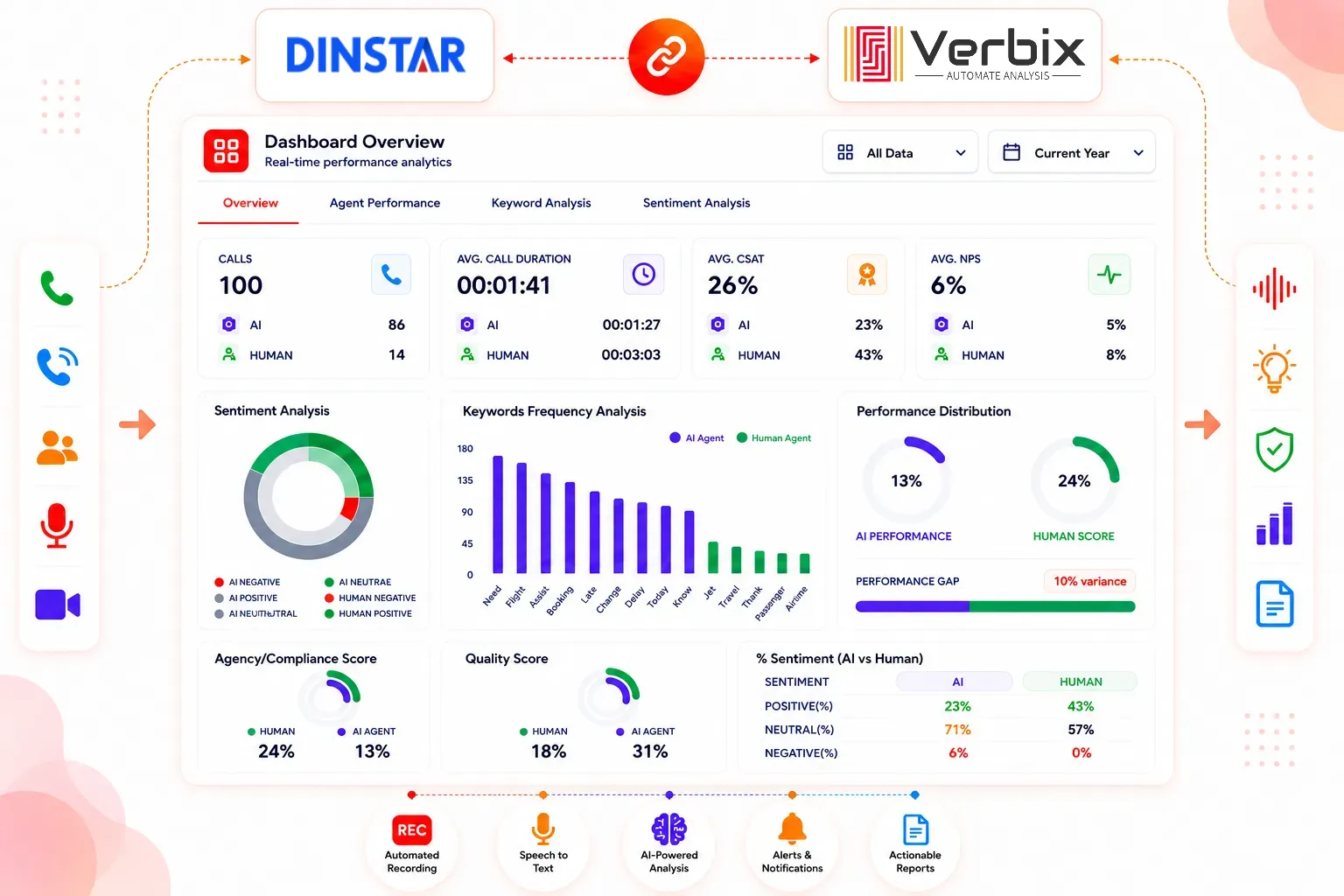
Is This What Your Team Is Facing?
Today's contact centers produce tens of thousands of customer conversations per day, which is impossible to monitor for quality and use to drive the customer experience manually.
Manual Call Reviews Take Too Much Time
Managers cannot manually listen to every Dinstar customer conversation. Analyzing recorded calls at scale can be a barrier for quality assurance and coaching.
Limited Customer Sentiment Visibility
Important customer feelings, issues, and returns may be trapped within recorded calls and go unnoticed.
Difficult Agent Performance Monitoring
Traditional call logs capture when calls happen and how long they last, but they don't show the full picture of how agents interact with customers.
Manual Conversation Monitoring
Searching for particular conversations, themes, or customer problems among recorded calls can be time-consuming.
Valuable Customer Insights Are Missed
The questions, objections, complaints, needs, and signals to buy from your customers can get lost in the mix.
Standard Reports Lack Conversation Context
Call logs and CDRs offer some operational detail but they do not reveal what was said in a conversation with a customer.
How Dinstar Cloud Telephony Call Analytics Works with Verbix
Intelligent Analytics in Four Simple Steps
Connect Your Dinstar Telephony Environment
Connect your supported Dinstar UC Series environment and configure the desired call-recording and event-reporting workflow. Dinstar UC200 Pro allows CDRs, Recording and Event Report based on normal UC200, while at the same time its Event Report interface can report Call Status, CDR and Recording via a configured URL.

AI Transcribes Every Conversation
Make the most of your Dinstar call recording by turning it into text using the AI transcription.
AI automatically identifies:
AI Generates Conversation Insights
Verbix processes conversations to detect significant patterns between customers and agents.
Analyze:
Access AI-Powered Analytics
Access conversation intelligence insights through a single analytics dashboard and easily find critical customer conversations, agent trends, and conversations to focus on.
AI-Powered Dinstar Cloud Telephony Analytics Dashboard
Turn Every Dinstar Conversation Into Actionable IntelligenceGet the full context of customer interactions, agent work, and call quality with a single AI-driven dashboard.
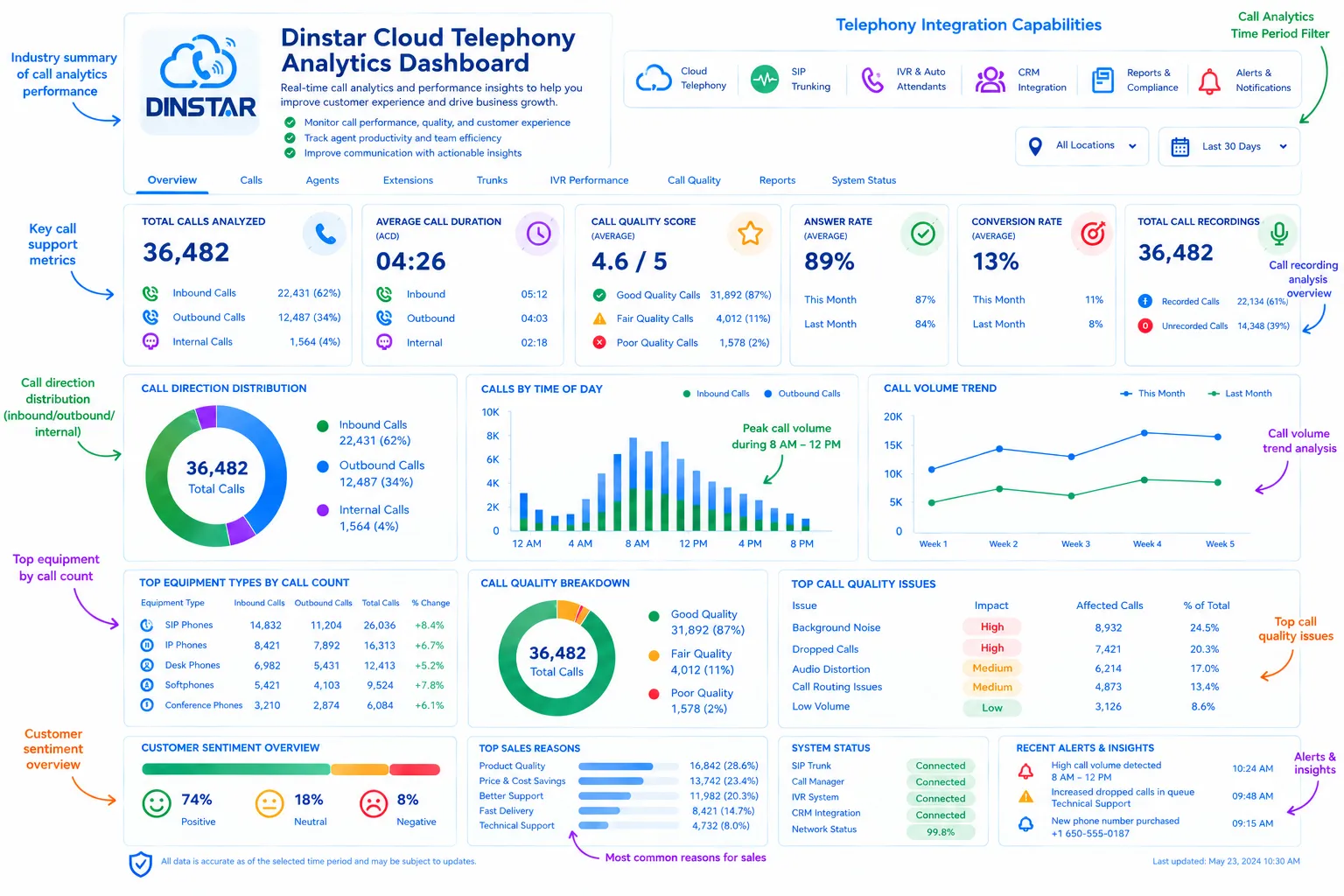
Dinstar UC Series supports CDR and recording, enables telephony records to be merged with conversation level AI analytics.
Analyze Every Dinstar Customer Conversation
Audit all internal, outbound, support, and collaborative channels on a single dashboard.

Customer Support
Listen on a broad scale to the problems, issues, questions, and support trends of customers within recorded calls.

Sales Calls
Recognize the needs, objections, and buying signals of your customers, along with potential sales.
Internal Helpdesk
Monitor all internal support discussions for recurring operational issues.

Finance & Billing
Monitor invoices-related inquiries, payment conversations, disputes, and customers' worries.

Technical Support
In this work, you will identify technical problems and know how agents manage troubleshooting conversations.

Agent-to-Agent
Study the conversations of internal communication, collaboration and sharing knowledge.
Powerful AI Capabilities
Verbix integrates multiple large language models to construct reliable call profiles.
AI Call Transcription
Turn Dinstar call recordings to conversation transcript and make it searchable.
AI Call Summaries
Create Power Dialer's concise customer conversation summaries automatically.
Customer Sentiment
Detect positive, neutral and negative sentiment in the conversations that were analyzed.
Agent Performance
Map Agent QA and Coaching efforts to conversation analytics over the month.
Conversation Search
Search the content of calls, whether by keywords, topics, phrases, or more.
Keyword Detection
Monitor key words, phrases, products, customer concerns, and topics of conversation.
Topic Detection
Spot subjects and themes that come up repeatedly in conversations.
Call Outcome Analysis
See how conversations end and uncover trends across different calls.
AI Playbooks
Build defined AI processes based on your organization's conversation analysis needs.
CRM Integration
Integrate conversation intelligence with your CRM and business workflows.
API Integration
Create custom integrations and workflows using your call analytics data.
Custom Monitoring
Set up analytics based on the conversation signals and metrics that are important to your business.
Flexible Enterprise-Grade Deployment
Choose the deployment option that best fits your organization.
Shared Cloud
Implement AI-driven call analytics in a platform that can scale with your business in the cloud, with centralized access to conversation intelligence.
- Fast deployment
- Managed infrastructure
- Easy scalability
- Centralized analytics
Private Cloud
For organizations looking for more control over infrastructure, access and data environments.
- Dedicated environment
- Greater control
- Enterprise security requirements
- Scalable architecture
Self-Hosted
If your organization's needs allow, you can deploy on your own infrastructure.
- Infrastructure control
- Data governance
- Custom deployment
- Enterprise flexibility
Start Small. Scale When Ready.
Quick Setup
Connect Dinstar
Connect your Dinstar UC Series telephony environment.
Enable Call Recording
You can enable call recording on the extensions, queues, or call flows that you want to analyze. Dinstar promotes recording as a feature of its supported UC Series IP PBX products.
Configure Event Reporting
Configure Dinstar Event Report functionality where appropriate to push call, CDR, and recording information to the desired endpoint.
AI Processes Conversations
Verbix processes the recordings that are available to it and creates transcripts, summaries, sentiment analyses, and conversation analytics.
Access Insights Instantly
Consolidate your workflows onto a single pane of glass to search conversations, read summaries, understand sentiment, and track agent performance.
Enterprise-Ready Dinstar Call Analytics
Integrate your Dinstar environment with an enterprise-grade AI analytics workflow.
Enterprise Capabilities
- Secure Integration
Integrate your Dinstar environment with an enterprise-grade AI analytics workflow.
- Enterprise Authentication
Manage access to conversation analytics and customer interaction data.
- Role-Based Access Control
Provide access to your administrators, managers, QA teams, and other users at the right levels.
- Data Security
Implement proper security controls for call recordings, transcripts, and analytics.
- Scalable Architecture
Handle growing call volumes and distributed teams.
- Flexible Deployment Options
Select the architecture that best suits your organization's infrastructure and security needs.
Real Results, Real Impact
Measure the Impact of AI-Powered Conversation AnalyticsImpact metrics are illustrative only. Actual results vary based on volume of calls, workflows, implementation, and organizational processes.
70%
Faster QA Reviews
90%
Reduced Manual Monitoring
35%
Increased Agent Productivity
25%
Improved Customer Satisfaction
60%
Faster Issue Resolution
100%
Searchable Call Archive
Customer Success Stories
Trusted by Customer Service Teams Worldwide.
Find out why companies are enhancing quality control, customer satisfaction, and business process efficiency with Verbix AI.





Frequently Asked Questions
Verbix is an option with supported Dinstar UC Series deployments and relevant call recording and event reporting workflows.
Yes. You can configure Verbix to analyze available Dinstar call recordings for transcription, summaries, sentiment, keywords, topics, and other conversation insights.
Yes. Dinstar promotes recording as a feature of its supported UC Series IP PBX systems, such as the UC200 Pro and UC8000.
Yes. Dinstar UC systems offer CDR capabilities to see and manage call-detail records.
Yes. The Dinstar documentation describes a Event Report feature which can send the call status, SIP info, SIP trunk info, CDR and recording info to a configured URL.
Yes. From analyzed conversations, Verbix can produce brief AI summaries.
Yes. Analysis of customer sentiment can discover sentiment trends in analyzed conversations.
Yes. Transcribed conversations can be searched by keywords, topics, phrases and other conversation attributes.
Yes. Conversation analytics allows managers to monitor agent communication patterns, conversation outcomes, sentiment, and other metrics that can be configured.
Dinstar provides Open API and event-reporting functionality on relevant systems to enable integration with third-party applications and workflows.
Connects with tools you already use
Verbix integrates seamlessly with your favorite CRM, helpdesk, and telephony applications to automate workflows.